
Mon 09:02 · Contract change. Their fourth draft restores the auto-renewal clause your client rejected in March. The comparison is ready.

Your expertise,
powered by AI

Alloomi is an AI teammate that understands legal work and how you get it done.
Alloomi stays up to speed on your matters, files, and workflows so it can move legal work forward and help your team reuse what works.

Get started
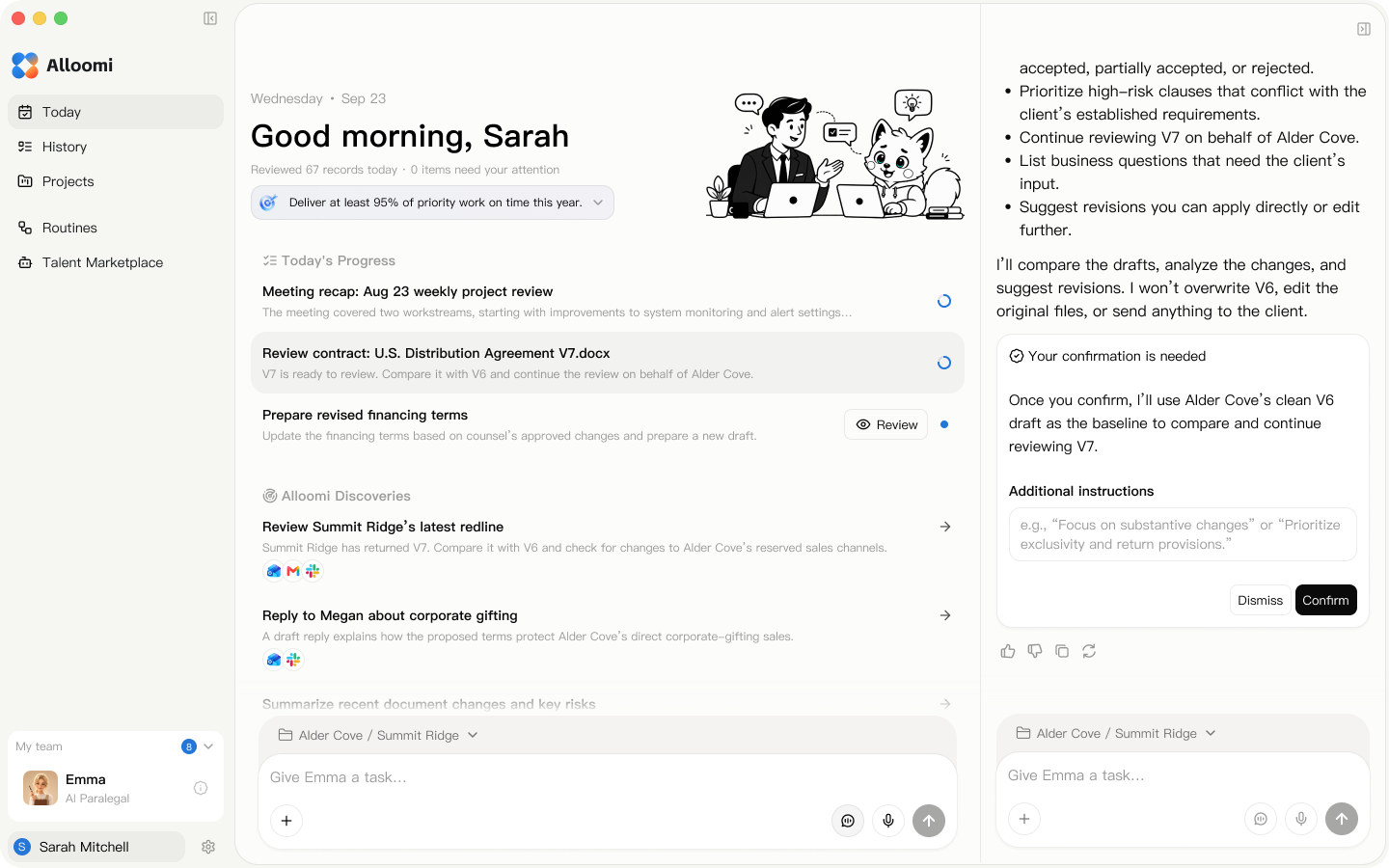
Alloomi workspace showing Sarah’s daily progress, discoveries, and contract review confirmation

Turn professional judgment into work that moves forward

Connect the apps and project files you use, surface open issues, and move approved work forward.

Contract Review

Review for the deal you’re actually doing

Alloomi reads the agreement in light of your client’s goals and deal facts. It flags clauses worth a closer look, explains the proposed edits, and lets you keep working in Word.

  • Review standards
  • Delivery obligations
  • Supporting sources
  • Word redlines

Document Drafting

Start with a draft that already knows the deal

Use the matter history to produce a workable first draft. For example, put the liability cap agreed on the call into the agreement and flag the exceptions that still need a decision.

  • Draft in context
  • Flag open items
  • Keep editing
Drafting inputsMatter factsClient positionTeam templateCounsel review
U.S. Exclusive Distribution AgreementDraft v1

Section 3 · Exclusive Distribution Rights

Supplier grants Distributor exclusive distribution rights in the territory and channels specified in this Agreement. Direct sales by Supplier and sales through group purchasing programs are excluded.

To confirm: whether the territory includes Puerto Rico

Section 8 · Brand & Marketing Approval

Distributor must submit proposed uses of Supplier’s brand assets and obtain Supplier’s written approval before use.

Daily Collaboration

When the meeting ends, the next steps are ready

From meeting prep to follow-up, Alloomi organizes the materials, records decisions, and flags your action items. Once you approve, it can draft the reply.

  • Connected context
  • Meeting prep
  • Meeting notes
  • Proactive tasks
  • Email replies
  • Email
  • Calendar
  • Files
  • Messages

Connect the context · Pull out key points · Prepare drafts

  • First draft
  • Draft reply
  • Meeting notes

See your assigned action items alongside the decisions and deadlines, then confirm what should happen next.

Project Follow-Through

When the project changes, know what to do next

When feedback, a decision, or a new draft comes in, Alloomi checks earlier versions, client emails, and meeting decisions to flag what needs your attention.

  • Spot changes
  • Track deadlines and follow-ups
  • Approve the next step
Project status and milestonesWatching for updates
  • Contract update to review

    The new draft restores automatic renewal. Check it against the client’s earlier email.

    To review
  • Upcoming milestone

    See what’s ready and what’s still open.

    Pending confirmation
  • Still waiting for a reply

    Prepare a follow-up draft for review.

    To follow up

Reusable Workflows

The better it knows your standards, the closer the work feels to yours

Reuse a client’s review standards, your preferred brief format, or the checklist your team runs before delivery. Alloomi connects project context, task execution, and feedback so the next task builds on your judgment.

  • Project memory
  • Execution methods
  • Learning at different levels
  • Where rules apply
How one task improves the next
  1. Bring the project context

    The context graph connects facts, versions, and sources.

  2. Record how the work got done

    The execution framework captures steps worth reusing

  3. Use proven methods on the next task

    Layered learning · Quality evaluation · Version control

What sets Alloomi apart from a general-purpose AI agent?

How general-purpose agents typically work

  • You decide when to start and spell out what you need.
  • Select the files, instructions, and context for the task.
  • Share what changed and ask how it affects the work.
  • Shape the output with examples, instructions, and templates.
  • Carry prior decisions forward and flag outdated materials.
  • Turn an answer into tasks, tool actions, and approvals.
  • Check sources, assumptions, and applicable versions.

How Alloomi works

  • Watch for relevant changes in files, projects, and conversations.
  • Start with current facts, prior decisions, and team standards.
  • See what changed, why it matters, and what needs attention.
  • Reuse approved judgments, templates, writing conventions, and delivery requirements.
  • Learn from completed work, expert review, and verified outcomes.
  • Turn the next step into a draft, a task, or an action you can approve.
  • Separate facts, assumptions, prior decisions, and recommendations. See what matters first.

Security and control

Stay in control of your work and data

  • AES-256 encryption for local data
  • Google CASA certification
  • Open-source core framework
01

You choose what to share

Choose the files you provide and the accounts Alloomi can access.

02

Your work is protected

Alloomi protects work content through encrypted transfers, controlled storage, and safeguards for sensitive information.

03

You approve key actions

Review proposed edits and drafts, then decide what to use. You make the final professional judgment.

How these controls work

Access stays within your permissions

Alloomi works within the permissions you grant for connected apps and files. Access is denied by default, limited to what’s needed, and checked on the server.

Review before taking action

You decide when to record meetings, run tasks, and send emails. Review edits and draft replies before sharing them.

Protecting data in transit and storage

Safeguards include secure transfers, encryption for stored sensitive data, access controls, and logs of key actions.

How we use your content

Alloomi uses the content you provide to deliver the service, including summaries, review suggestions, and drafts. We may use eligible de-identified or aggregated information for analytics and service improvements. Privacy Policy ↗

Context that stays current. Learning that improves the work. Action when it matters.

Full-context understanding

Alloomi keeps people, projects, files, decisions, and history in one up-to-date context that informs each action.

LongMemEval-S
97.6%
LoCoMo-V2
97.4%
BEAM @ 10M
67.0%
Read the technical report

Continuous improvement

Alloomi learns from task execution and expert corrections, then applies validated lessons to future work.

CL-bench
24.5% → 47.6%
Same base model
+23.1 pp
Read the technical report

Proactive assistance

Alloomi monitors approved OKR signals, identifies changes worth your attention, and takes the next step within the rules you set.

Turn your expertise into your AI

Get the full experience on PC

Copy the link, send it to your computer, and open it in your browser.
You’ll receive 30,000 credits for free.

Or send it by email
Your email is only used to send this product link