Contract version comparison is the process of identifying what changed between drafts and determining whether those changes affect the parties' rights, obligations, cost, timing, or risk.
A redline can show that words moved, appeared, or disappeared. It does not automatically explain why the edit matters. That second step requires contract context, knowledge of the transaction, and a clear record of the position the parties intended to reach.
This distinction becomes especially important when a negotiation produces many drafts, comments arrive through different channels, or the agreement includes schedules and exhibits maintained by separate teams. A reviewer may correctly identify every textual edit and still miss the commercial consequence of the new language.
Why Contract Version Comparison Is Harder Than It Looks
Version comparison often appears mechanical. Open two files, run a comparison, and review the redline. In practice, several problems make that approach unreliable.
The files may not share the same formatting. A document may have been converted from PDF, copied into a new template, or renumbered before it was returned. Formatting noise can make a small substantive edit difficult to see.
The filename may also be misleading. A document called "final" may not be the version that was approved, signed, or most recently circulated. Attachments may have been updated without changing the main agreement. Comments in email may reflect an agreed position that never reached the draft.
Most importantly, the legal effect of an edit may extend beyond the clause where it appears. A change to a defined term can affect several sections. A revised delivery date can alter payment, acceptance, service credits, and termination rights. Removing a single exception can change the allocation of risk across the agreement.
Effective comparison therefore asks two questions:
• What text changed?
• What does that change do to the deal?
Establish the Correct Baseline
Before comparing language, confirm which documents should be compared.
Identify the last version approved or sent by your side, the new version received from the counterparty, and any exhibits or schedules that changed at the same time. Check document properties, email history, naming conventions, and approval records rather than relying only on filenames.
The baseline should answer:
• Which version represents the last known position?
• Who prepared and circulated each file?
• Were tracked changes accepted before the document was returned?
• Did any schedule, exhibit, order form, or data attachment change separately?
• Are there comments or agreed points that have not yet been incorporated?
If the baseline is wrong, an accurate comparison can still produce the wrong conclusion.
Run Both a Document-Level and Clause-Level Comparison
Start with a document-level comparison to identify additions, deletions, moved sections, numbering changes, and formatting differences. Then review important clauses individually against the negotiation record and the organization's preferred position.
Document-level comparison is useful for coverage. Clause-level comparison is useful for meaning.
For example, a document comparison may show that the counterparty added the words "to the extent caused by." Clause-level review should then determine whether the edit narrows an indemnity obligation, changes the applicable causation standard, or conflicts with another provision.
Do not assume that a clean-looking draft contains no changes. Compare clean copies as well as redlined versions, especially before approval or signature.
Separate Formatting Noise From Substantive Changes
Not every visible edit deserves the same attention. Classifying changes early helps reviewers spend time where judgment is required.
Formatting changes include fonts, spacing, paragraph breaks, automatic numbering, headers, and non-substantive punctuation. Administrative changes include addresses, notice details, names, and dates. Substantive changes can modify obligations, rights, remedies, standards, timing, financial exposure, or decision authority.
The category should not be assigned solely by appearance. A date looks administrative but may control renewal or termination. A defined term may contain only three changed words but affect the entire agreement. A punctuation change can occasionally alter scope.
The practical test is whether the change could alter what a party must do, may do, must pay, may recover, or may refuse.
Trace Each Material Change to Its Consequence
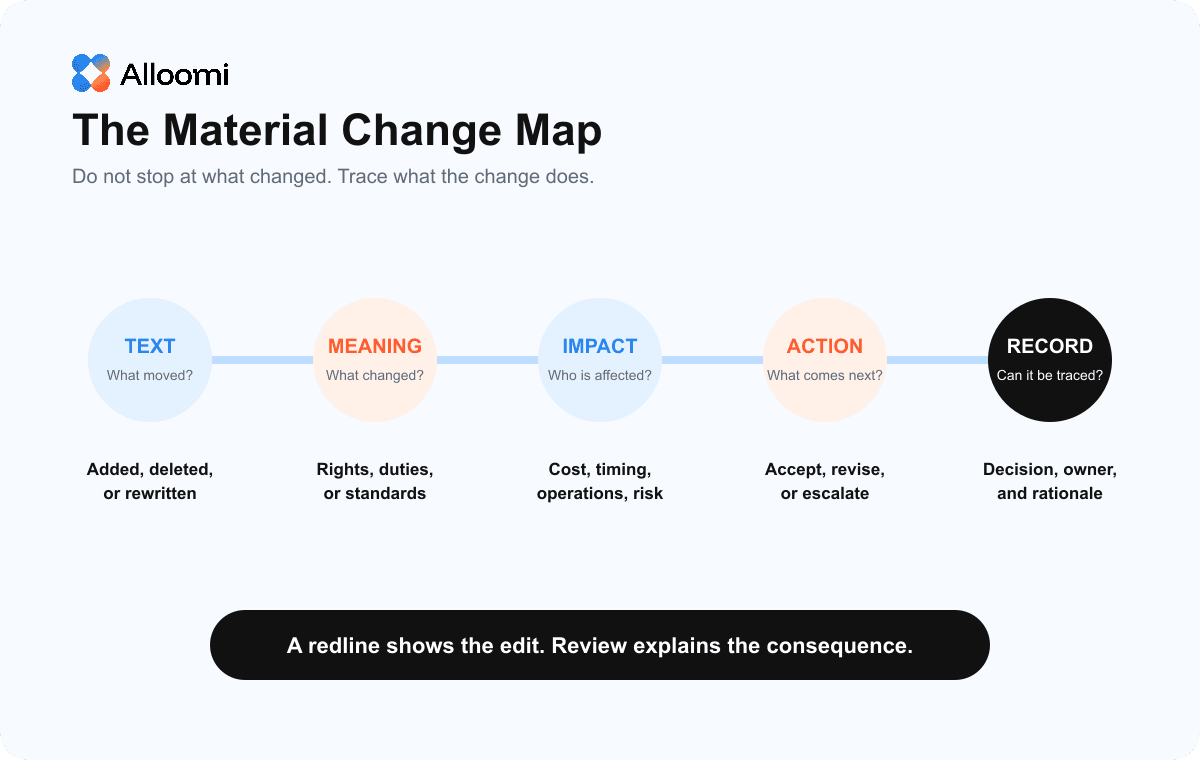
For every potentially material change, record the edit, its meaning, its operational effect, and the recommended response.
Useful review notes answer:
• What was the prior language or position?
• What does the new language require or permit?
• Which party benefits from the change?
• Does it affect cost, timing, process, control, liability, or enforceability?
• Does another clause need a corresponding update?
• Should the change be accepted, revised, rejected, or escalated?
This approach turns a redline into a decision record rather than a collection of colored edits.
Check for Ripple Effects Across the Agreement
Contract provisions work together. A reviewer should search the document for every defined term, cross-reference, schedule, and related obligation affected by a material edit.
If the definition of "Services" changes, confirm whether pricing, acceptance, warranties, security duties, and termination assistance still apply as intended. If a liability cap changes, check whether indemnities, confidentiality, data protection, and excluded damages refer to that cap. If the term is extended, verify renewal dates, notice windows, minimum commitments, and pricing periods.
This is also the point to check incorporated documents. The main agreement may refer to policies, statements of work, service descriptions, or online terms. A version change in one file may create an inconsistency elsewhere.
Compare Against the Negotiation Record
The current draft should be tested against more than the previous file. Compare it with the issues list, approval comments, negotiation emails, meeting notes, and client instructions.
This step can reveal silent reversals. A counterparty may restore language previously rejected, omit an agreed qualification, or revise a related clause while preserving the appearance of compromise.
A reliable issues list should show the requested position, the counterparty response, the current language, the decision owner, and the status of the issue. It becomes especially useful when responsibility passes from one reviewer to another.
Preserve a Clear Decision Trail
The final review record should explain not only what changed but why the final language was accepted.
Record the version reviewed, the date, the material issues identified, the recommended response, the approver, and any conditions attached to approval. Keep the final redline and clean execution version together.
This record supports future amendments, disputes, renewals, audits, and institutional knowledge. It also reduces the risk that a later reviewer must reconstruct the negotiation from scattered emails.
How AI Can Support Contract Version Comparison
AI can help identify textual differences, group related edits, search for affected defined terms, and prepare a first-pass summary of material changes. It can also compare revised language against an approved clause position or negotiation playbook.
Alloomi AI can support contract review by helping teams analyze language in context, surface issues, and connect review findings to relevant sources and prior work. For a broader review workflow, see How to Review a Contract.
AI output should still be verified against the actual documents. The reviewer should confirm that the correct versions were used, every attachment was included, the comparison did not confuse formatting with substance, and each conclusion is supported by the operative language.
Common Contract Comparison Mistakes
One common mistake is reviewing only the counterparty's redline. A self-generated comparison may reveal edits that were not tracked or were made after tracked changes were accepted.
Another is treating every visible change equally. Excessive attention to formatting can hide meaningful changes, while a seemingly small definition edit may receive too little scrutiny.
Reviewers also miss risk when they analyze clauses in isolation. The consequence of an edit may appear in a cross-reference, exhibit, or remedy several pages away.
Finally, teams sometimes approve a draft without preserving the rationale. That makes future review slower and can create uncertainty about whether a position was intentional or accidental.
Conclusion
Comparing contract versions is not complete when the redline is generated. The reviewer must establish the correct baseline, separate noise from substance, trace material edits to their consequences, check related provisions, and record the final decision.
The goal is not merely to find different words. It is to understand whether the deal changed and make that change visible to the people responsible for approving it.
Frequently Asked Questions
1. What is a material change in a contract?
A material change is an edit that may affect a party's rights, obligations, cost, timing, remedies, decision authority, or exposure. Materiality depends on the agreement and transaction, not simply on the number of words changed.
2. Is a redline enough to compare contract versions?
No. A redline identifies textual differences, but a reviewer must still evaluate legal and commercial meaning, check related provisions, and compare the new draft with negotiation instructions and approvals.
3. Can AI compare two contracts?
AI can help identify and summarize differences between contract versions. A qualified human should verify that the correct files were compared and confirm the effect of each material change before approval or signature.