Redaction is not the act of drawing a black rectangle over text. It is the removal of sensitive information from the file that will be shared, filed, produced, or published.
That distinction matters because a document can look redacted while the hidden text remains searchable, selectable, recoverable, or exposed in metadata. AI can help locate likely personal information, privileged communications, trade secrets, and confidential facts, but it should not be the final authority on what must be removed or what may lawfully remain public.
A defensible process separates detection, legal decision, technical redaction, and verification.
Why Visual Covering Is Not Real Redaction
A black shape placed above text may hide the words on screen while leaving the original content underneath. A reader may be able to copy and paste the covered text, remove the overlay, search the document, inspect layers, or recover the content from another version.
Similar problems occur when a word processor uses highlighting, font color, cropping, or comments instead of removing data. Hidden spreadsheet cells, revision history, document properties, attachments, OCR text, and image layers can also expose information that is no longer visible on the page.
Courts regularly warn filers that privacy information must be properly redacted. The U.S. Bankruptcy Court guidance on redaction explains that effective redaction requires eliminating the private data rather than merely covering it.
What AI Can Help Identify
AI-assisted review can help locate patterns that are easy to miss across long or inconsistent files. Depending on the matter, a review may look for:
• Social Security, taxpayer, passport, driver's license, and account numbers
• Dates of birth, home addresses, telephone numbers, and personal email addresses
• Names or identifying details of minors, witnesses, patients, employees, or protected individuals
• Medical, education, employment, financial, and disciplinary information
• Attorney-client communications and attorney work product
• Trade secrets, source code, pricing, customer information, and proprietary processes
• Information covered by a protective order, sealing order, statute, regulation, contract, or court rule
Detection is only the first step. The same number may require redaction in one filing and remain necessary in another. A name may be public in the docket but protected by a specific order. AI can surface candidates; authorized legal reviewers must decide what the governing rule requires.
Start With the Rule, Order, and Audience
Before running a redaction tool, identify why the document is being shared and who will receive it. A public court filing, confidential production, client report, regulator response, transaction data room, and internal investigation may follow different rules.
Review the applicable procedural rule, local rule, judge's individual practices, protective order, confidentiality agreement, privacy law, and filing instructions. Federal Rule of Civil Procedure 5.2, for example, addresses privacy protections for filings made with the court. It does not answer every question about sealing, confidential discovery, state law, or a particular judge's requirements.
The redaction log should record the category, reason, reviewer, and authority when the context calls for it. This helps distinguish a lawful redaction from an accidental omission or an unexplained blackout.
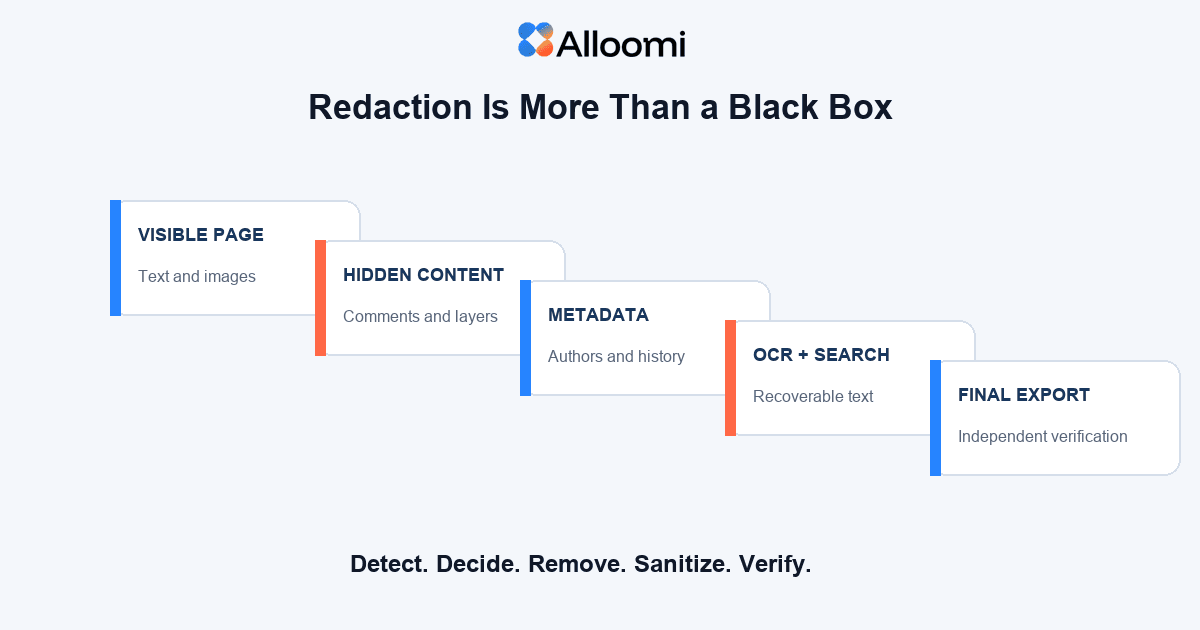
A legal redaction is complete only after the visible page and the underlying file have both been checked.
A Defensible AI-Assisted Redaction Workflow
Preserve the Original
Keep an access-controlled original before making changes. Work from a copy and use a naming convention that prevents the redacted version from being confused with the source. Preserve chain-of-custody information when the document is evidence or part of a regulated process.
Prepare the Source File
Confirm file type, page count, attachments, comments, tracked changes, embedded objects, signatures, images, and OCR quality. Poor scans and handwritten annotations may require separate review. If the tool cannot reliably read a file, record that limitation instead of assuming no sensitive content exists.
Use AI to Flag Candidates
Run the approved detection workflow using defined categories and matter-specific terms. Include names, aliases, project codes, account patterns, sensitive topics, and protective-order designations. Require the system to show the page and surrounding context for every proposed item.
Make the Legal Decision
An authorized reviewer determines whether each candidate should be redacted, left visible, withheld, or escalated. The decision should account for relevance, filing requirements, privilege, waiver, public-access principles, and any obligation to provide a redaction log or sealed version.
Apply Permanent Redaction
Use a tool that removes the underlying content from the output. Redact all instances, including headers, footers, tables, images, annotations, and repeated identifiers. When an image contains sensitive content, ensure the pixels and OCR text are both addressed.
Sanitize the File
Remove comments, tracked changes, hidden text, document properties, author names, prior versions, embedded files, scripts, form values, attachments, and unnecessary metadata. Flattening may help in some workflows, but it is not a substitute for verification.
Verify the Export
Open the final file in a separate viewer. Search for the removed terms. Try to select and copy the redacted area. Review document properties and attachments. Run OCR or text extraction on the exported file when appropriate. Compare page count and layout with the source to detect missing or shifted content.
What AI Commonly Misses
AI may miss information embedded in images, handwriting, low-quality scans, unusual tables, diagrams, headers, footers, or attachments. It may fail to recognize an identifier when spacing or punctuation changes. It can also over-redact common words because the model does not understand the legal purpose of the document.
Context creates another problem. A system may correctly recognize an email between a lawyer and client but cannot safely determine privilege without understanding participants, purpose, waiver, exceptions, and governing law. Similarly, identifying a trade secret requires more than finding technical vocabulary.
For that reason, AI detection should support a review protocol rather than replace it.
Redaction, Sealing, and Withholding Are Different
Redaction removes selected information from a document while leaving the remainder available. Sealing restricts access to some or all of a filed document under a court order or applicable rule. Withholding means the document is not produced, often because of privilege, protection, or another valid basis.
These options should not be treated as interchangeable. Courts may require a narrowly tailored redaction rather than full sealing. Discovery rules may require a privilege log when material is withheld. A public version and sealed unredacted version may have different filing procedures.
Check the governing authority before deciding that a technical redaction solves the legal issue.
Client Confidentiality Starts Before Upload
A redaction tool cannot protect information that should never have been uploaded to it. Before using AI, determine whether the platform is approved for client data, how inputs are retained, whether data is used for training, where it is processed, who can access it, and what contractual safeguards apply.
ABA Formal Opinion 512 discusses lawyers' professional duties when using generative AI, including competence, confidentiality, communication, supervision, and fees. Firm policy and client requirements may impose additional controls.
How Alloomi Can Support Legal Redaction Review
Alloomi AI can help authorized teams organize documents, identify potentially sensitive passages, compare related materials, and preserve reviewer comments in the matter context. That can reduce the time spent locating repeated identifiers and reconstructing why a passage was flagged.
Alloomi does not decide whether information is privileged, sealable, legally protected, or required in a filing. A qualified reviewer must apply the governing rule and verify the final exported file.
For connected workflows, read What Is Privilege Review?, Can Using AI Waive Attorney-Client Privilege?, and Your Lawyers Are Already Using AI. Does Your Firm Have a Policy?.
Final Redaction Checklist
• The governing rule, order, agreement, and audience were confirmed.
• The original file was preserved separately.
• The entire document, including attachments and images, was reviewed.
• Every redaction was approved by an authorized reviewer.
• Underlying text and OCR data were removed.
• Comments, tracked changes, hidden content, and metadata were sanitized.
• The exported file was searched and tested in a separate viewer.
• The public, confidential, and sealed versions were clearly distinguished.
• Filing or production instructions were checked one final time.
Conclusion
AI can make sensitive information easier to find, but detection is not redaction and redaction is not a legal conclusion. The defensible process begins with the applicable rule, assigns decisions to qualified reviewers, permanently removes the approved content, and tests the final file for recoverability.
If the team cannot explain what was removed, why it was removed, who approved it, and how the export was verified, the document is not ready to leave the controlled environment.
Frequently Asked Questions
1. Can AI automatically redact a legal document?
AI may automatically identify and technically redact candidate information, but a qualified reviewer should confirm the categories, legal basis, completeness, and final export before the document is shared or filed.
2. Is placing a black box over text sufficient?
Not necessarily. If the underlying text remains searchable, selectable, or recoverable, the information has not been securely redacted.
3. Should a law firm upload an unredacted client document to any AI tool?
No. The firm should first confirm that the platform, contractual terms, retention settings, security controls, and intended use comply with professional duties, firm policy, client requirements, and applicable law.